Installation#
Prerequisites#
Python 3.6, 3.7, or 3.8
Member of the ATLAS or CMS collaborations
Installation#
pip install servicex-clients
This is an umbrella package which includes all of the frontend client libraries used to communicate with a ServiceX backend. There are multiple ways to specify a request, but we will use func-ADL in this tutorial.
Selecting an endpoint#
To use the ServiceX client, you will need a ServiceX API token issued by a ServiceX backend instance. Each ServiceX instance is dedicated to a specific experiment and file format. You can use one of the centrally-managed instances of ServiceX running on the University of Chicago’s Analysis Facility cluster:
Endpoint |
Collaboration |
Type |
Input |
|---|---|---|---|
ATLAS |
xaod |
xAOD files |
|
ATLAS |
uproot |
Flat ntuples |
You can view the status of these production servers along with our current development servers by viewing the Server Status Dashboard.
Visit the instance that meets your needs. Click on the Sign-in button in the upper right hand corner. You will be asked to authenticate via GlobusAuth and complete a registration form. Once this form is submitted, it will be reviewed by SSL staff. You will receive an email upon approval.
At this time you may return to the ServiceX page. Click on your name in the upper right hand corner and then select Profile tab. Click on the download button to have a servicex.yaml file generated with your access token and downloaded to your computer.
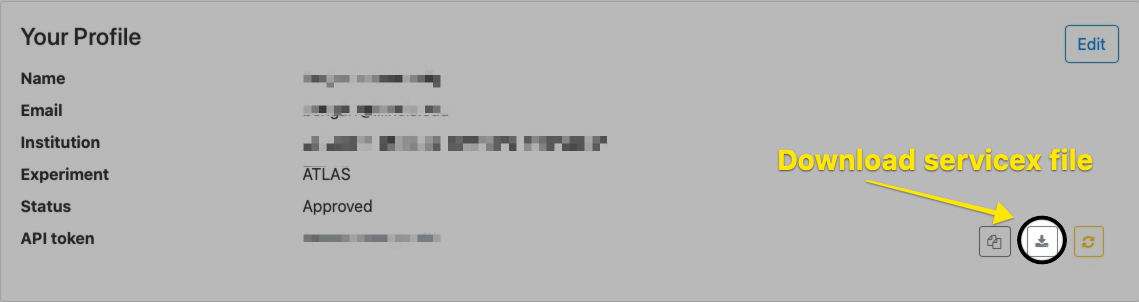
You may place this in your home directory or within the servicex_frontend search path.
The remainder of this guide will use the xAOD instance.